

 Bank payments
 Card payments
 Apple Pay / Google Pay
 POS terminals
 Buy Now, Pay Later
 Shipping+ and Shipping+ Pro
 Click to pay
 Refunds
 Recurring payments
 Payment link
 Donations
 Kniks gift card
 Merchant financing
 Payments for accommodation businesses
 Payments for service businesses
Click To Pay
Offer your customers a simpler and more convenient way to pay online by card. Click to Pay helps streamline checkout and makes card payments faster, smoother and more familiar.
What is Click to Pay  ?
?
A faster way for your customers to pay by card – without typing anything
Typing in card numbers, expiry dates and CVV codes at checkout can be slow and frustrating. Click to Pay makes card payments faster and easier.
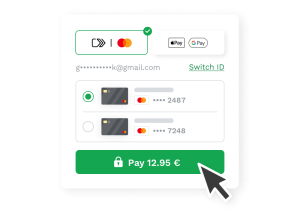
Once a customer has saved their card with their bank or card provider, they can use Click to Pay at checkout instead of filling in the card form manually. They simply choose Click to Pay, confirm their identity, and complete the payment.
Supported by


How it Works
Two simple processes – one done once, one done every time
Done once
Enrolling a card
Customer saves their cardThey enroll their card through their bank, card provider, or at any supported checkout. It only needs to happen once.
Card is remembered across storesOnce enrolled, the card is recognized at every supported checkout – no need to repeat the process anywhere.
Every purchase
Paying at checkout
The button appearsAt checkout on your store, enrolled customers see the Click to Pay option instead of a blank card form.
Customer confirms it’s themA quick one-time code confirms it’s them. Takes a few seconds.
Payment goes throughDone. No card typing, no form filling. The whole process is quick and familiar.
Available to all MakeCommerce merchants
Benefits for Your Business
Higher conversion at checkout
A faster, smoother card payment experience helps more customers complete their purchases.
Fewer abandoned carts
Entering card details can slow customers down, especially on mobile. Click to Pay removes unnecessary typing and makes checkout easier.
Higher approval, less fraud
Card details are tokenised and never stored on your website, helping reduce fraud risk while improving payment approval rates.
No extra integration needed
Already using MakeCommerce card payments? Click to Pay is included. Nothing to set up.
For your customers
Benefits for Your Customers
One-click card payments
No card needed at checkout. Customers who have enrolled pay in a single click.
No more manual card entry
No more typing 16 digits on a phone screen. Saved card details are used automatically.
Secure and familiar
A one-time code confirms the payment. Backed by Visa and Mastercard.
Works on any device
Phone, tablet, or desktop – the experience is the same fast, simple checkout.
Interested in Click to Pay?
Customer success stories
Click to Pay in action
Click to Pay is already helping merchants create faster, simpler and more secure checkout experiences. Mastercard customer success stories show strong adoption, shorter checkout times and more successful transactions.
Faster checkout and higher conversions
Norwegian Air Shuttle piloted Click to Pay to give flight customers a smoother guest checkout experience.
More successful transactions
Cinépolis introduced Click to Pay to make online ticket checkout quicker and easier for cinema customers.
Based on Mastercard customer success stories, merchant data and proprietary data.
Find answers
Frequently Asked Questions
How is Click to Pay different from other online payment solutions?
Click to Pay is a faster, more secure way to pay online by card. It is based on global payment standards and works across channels and devices. You can think of Click to Pay like Chip and PIN but for ecommerce.
How do cardholders create a Click to Pay profile?
Cardholders only need to enroll once to access their profile at participating merchants. There are three ways to enroll:
- Merchant website: register during checkout to be recognized during future transactions.
- Mobile banking app or website: register and follow the prompt from your card issuer to enroll your payment credentials.
- Mastercard website: new users can enroll and manage their Click to Pay profile at mastercard.com/clicktopay.
Is Click to Pay secure?
Click to Pay uses tokenization and authentication standards to enhance security and reduce fraud. It also leverages behavioral analytics and biometrics to confidently identify legitimate customers in real time. For additional security, a one-time verification is always required to update personal information. Your customers may also need to provide a one-time verification code to access their Click to Pay profile.
Where and how can cardholders use Click to Pay?
Click to Pay is designed to work across devices and web browsers. Customers can use it wherever Mastercard is accepted and the Click to Pay option is available at checkout. They are recognised through mobile number or email lookup and shown their saved cards directly within your guest checkout.
How much does Click to Pay cost?
Click to Pay is free for your customers.
How can I implement Click to Pay?
Click to Pay is available to all merchants who have card payments activated via MakeCommerce.
Have more questions or want a quote?
Fill out the form, and we will contact you shortly.